
To understand how they work, you first need to know that PCs work with three different types of memory: The first is the primary memory in the form of a hard disk (HDD) or SSD (Solid State Disk). This is the memory with the largest capacity. Then comes the main memory (RAM), which is a lot faster, but also smaller than the primary memory.
Last but not least, there is also memory within the processor — the cache. It is the type of memory that works the fastest. As soon as a program starts, it executes a series of commands that can be found in the software’s code. The program first loads these commands into RAM, from where they are transferred to the CPU. For the best possible execution of these instructions, the processor needs very fast memory. This is where the cache comes into play.
The cache is a temporary data store located directly on the processor. It is used to increase the processing efficiency of the processor by holding frequently requested bits of data ready to be retrieved at high speed.
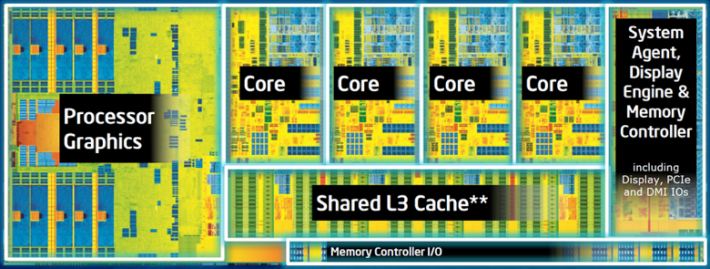
Cache memory consists of different levels called L1, L2, L3 and occasionally L4, which differ in location, speed and size. The cache memory is extremely fast and positioned as close as possible to the processor cores. Modern, fast CPUs are not slowed down by requests for data from the relatively slow system memory (RAM). Instead, they can retrieve the data from the cache.
The L1 cache, also called the primary cache, is the smallest and fastest memory level. It is usually 64 KB per core, so that a quad-core CPU, for example, has a total of 256 KB.
The L2 cache is the secondary memory cache that is also embedded in each individual core of the CPU. It almost always has more memory than the L1 cache, but operates at a slower speed, although still significantly faster than main system memory. Some high-end processors can have a total of 32 MB of L2 cache, but 6 to 12 MB is the average.
Now for the third cache: Unlike the L1 and L2 caches embedded in each CPU core, the L3 cache serves as a shared memory pool that can be accessed by the entire processor. It is much slower than the L1 and L2 cache levels — and usually only twice as fast as RAM. At the same time, it is the largest of all three memory levels. If the CPU cannot find the data it needs in the cache memory, it must request the data from the slower system memory instead. This is called a cache miss.
On the question of whether the cache can be cleared manually: Basically, there are memory caches that can be cleared or flushed, such as the system cache or the browser cache. However, you cannot actively delete the CPU cache memory. The reason: It is a volatile memory. This means that it does not retain its contents in the long term.
As soon as you switch off the computer, the content in your processor’s cache memory is lost. As with most types of memory, the more cache a CPU offers, the better. You can’t upgrade cache memory, so it’s important that the processor you choose has enough memory available.
ΠΗΓΗ: https://www.pcworld.com/article/2066872/how-does-cpu-memory-cache-work.html